Hi all, just a quick question. We are using Yahoo/SBC DSL and we already setup a DSL router without any problem. However, in the house, we have a downstair family room which we wired just ONE network cable to the room so it could only connect to ONE PC, but right now we just setup another PC in that family room, and we want to make the 2nd PC to be able to connect to the Internet as well. But it's really a long distance and a lot of trouble to rewire another network cable from our upstair living room to downstair family room. Is there any way that TWO PC could share with ONE network cable to allow both PC to be able to connect to the Internet. We don't want to use wireless network as the signal is kind of weak. As the two PC in the family room is kind of close to each other, could I add another NIC in both PC and network these two PC and let them share Internet connection this way?? Many thanks!
DSL Router Splitter question
Jul 29, 2006
5 Replies
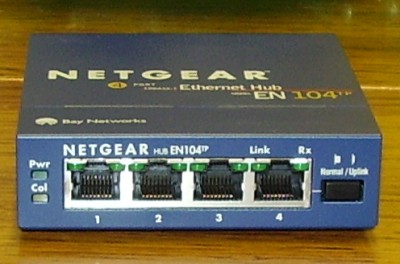
What you need is called a "hub". It is an inexpensive box that allows one ethernet connection be expanded to multiple ports. Hubs typically can have from 4 to 32 ports. Plug the existing network cable into the hub (there is usually a dedicated jack for the "uplink"). Both PCs willrequire a network card and ethernet cable.
Plug each PC into the other hub jacks. Your current router will hand out a different IP address to the new PC. The router never sees the hub, it is there to allow the ethernet signal to be shared without degrading.
If your router and network cabling supports 100BaseT, buy a 10/100BaseT hub. Otherwise, you can get a 10BaseT hub for next to nothing.
Read more at:
formatting link
--Gene
From:
| Hi all, just a quick question. We are using Yahoo/SBC DSL and we | already setup a DSL router without any problem. However, in the house, | we have a downstair family room which we wired just ONE network cable | to the room so it could only connect to ONE PC, but right now we just | setup another PC in that family room, and we want to make the 2nd PC to | be able to connect to the Internet as well. But it's really a long | distance and a lot of trouble to rewire another network cable from our | upstair living room to downstair family room. Is there any way that TWO | PC could share with ONE network cable to allow both PC to be able to | connect to the Internet. We don't want to use wireless network as the | signal is kind of weak. As the two PC in the family room is kind of | close to each other, could I add another NIC in both PC and network | these two PC and let them share Internet connection this way?? Many | thanks!
The technical terms for a devices that fan out one twisted pair Ethernet cable to multiple Ethernet ports are "Ethernet Hubs" and "Ethernet Switches".
You can pick up an Linksys 8 port Ethernet Switch for ~$50.00 US. Hubs are not as good as Ethernet Switches (I'm not going to get into the technical reasons why) but they are common and cost even less. In either case you can then hook up multiple computers or Game Boxes such as the XBox and PlayStation/2.
snipped-for-privacy@hotmail.com wrote in part:
There are at least four ways you can do this:
1) break-out boxes which use two pairs (of the Cat5 cable) for each computer. They are passive, but usually have to be custom made. 2) MS-Windows "Internet Connection Sharing" over a serial or parallel null modem cable. 3) An active hub or switch in the family room as others have suggested. This is probably the easiest, off-the-shelf, but does require power. 4) Re-cast the network topography. Move DSL modem & router to family room, send connectivity back upstairs. This requires phone & power.-- Robert
You just tell what you are looking for to Yahoo/AT&T(SBC). They can provide a hardware for you at nocost.
These are actually quite common and available off-the-shelf from any decent hardware shop. They are also easily the cheapest solution.
Go to
formatting link
and look at the bottom half of the page for some examples.
Billy Y..
Join the Discussion
Have something to add? Share your thoughts — no account required.
Didn't find your answer?
Ask the community — no account required