getting wifi to the dead zones of a big house (2nd DSL Modem and router combo?)

Jan 14, 2009 42 Replies
getting wifi to the dead zones of a big house (2nd DSL Modem and  router combo?) open original image

Hello.


I know this is the most common query out here, but I've not quite found the solution in my reading various posts. So, at the risk of repetitive, I'll put my problem out there.


We live in an old four-story house with brick and plaster walls. the DSL modem and wirelessRouter #1 are in the Rear end of the 2nd floor. Wifi reception all along the front side of the house (floors 1-4 is low at best, usually Zero.)


I am trying to figure out how to best extend the range to reach these corners.


  1. I can't really move the modem and Router#1.
  2. Nor can I run ethernet to a point where I could set up a second access point (if I am reading correctly, a second wireless AP MUST to wired to the first router. if that is NOT correct, could someone explain how to set up a standalone, unwired AP?)
  3. I have several wifi routers and DSL modems.
  4. there are telephone jacks all over the house.

So, Question (beyond the "how, given the wiring constraints, best to set up another AP?"):


- can I plug a second DSL modem into one of the other telephone jacks and attach another router to that modem and have a working second AP that way??


many thanks


Peter


On Wed, 14 Jan 2009 08:24:13 -0800 (PST), peter wrote in :

Not surprising -- plaster is bad for Wi-Fi because it's applied over a wire mesh that blocks Wi-Fi.

You can set up a WDS wireless repeater, but at best it cuts speed in half, can be a security issue, and can be problematic.

Better is a true wireless extender, wireless Ethernet client bridge back to back with a wireless access point on a different non-overlapping channel, but that's considerably more expensive.

In a word, no -- only one DSL modem can be on a given DSL service.

Your best bet is probably powerline networking to a remote wireless access point and/or directly to remote wired client computers. See recent posts here where I listed a couple of the more affordable powerline networking kits.

try adding powerline APs?

this is the netgear UK flavour - pick one that works with your local mains system.

formatting link
note this one is a kit with 1 unit to connect to your router and 1 remote AP - it sounds like you may want multiple APs.

Why not? Wire is cheap and the labor to do it isn't much more. You end up with a reliable setup, not a hodge-podge of junk ready to die at the slightest hiccough of the powerlines, or wifi interferences.

It's one thing when there's a long stretch of solid concrete between locations, but for a typical residence wired really isn't all that difficult to manage.

On Wed, 14 Jan 2009 18:05:10 -0500, "Bill Kearney" wrote in :

Pulling proper Ethernet is usually a lot more expense and hassle than powerline networking, which works quite well.

Don't think you can have multiple DSL modems on the same account... we could have had two cable modems, however not on the same account (we would have had to pay double)

Rather than pay for a second account, we simply used a 2nd ap (different ssid,DHCP server left on, powerline networking, 1st wap/router has one pn device plugged into the router part and second into the router part (not the wan) of the second wap/router... have full network and internet access on the second - no idea why thats working snce the gurus here said it won't, but i've been using it that way for about 2 years :)

as an aside, just ordered these, supposed to work like powerline but over coax, and there's already coax throuought the house, got coax or power, besides phone lines all over?....

formatting link

On Wed, 14 Jan 2009 20:03:22 -0500, "Peter Pan" wrote in :

Nonsense.

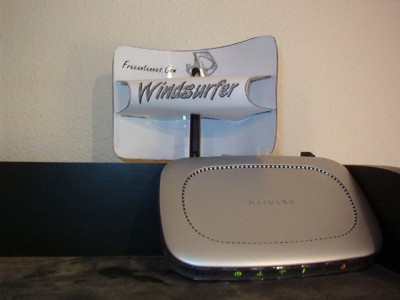
If you have some signal, a simple reflector might give you enough boost.

formatting link
EZ-12, printed on photo paper for thick stock, with aluminum foil glued to the sail, provides a substantial boost in signal.
formatting link
Make the tabs longer than the template drawing for easier assembly.

see what I mean, i'm using it now, and posting from/via it... I suppose if you can't read this he's right, but if you can, he's wrong..... :)

I just drew this out on paper...

When you are connected to the 1st WAP, what's your IP address & Gateway address ?

When connected to the 2nd WAP, what's your IP and GW ?

I am sure that what was meant is that it is nonsense that a "guru" said it would not work.

That is standard networking. As you can see missunderstandings are easy in this medium:)

Just take care not to overlap your dhcp ranges if you have 2 dhcp servers.

no gateway used, starting ip address for #1 1.1 #2 1.10 dhcp range for #1 start at 1.100 for 40, and #2 start at 1.200 for 40 (probably could have left it 50, but didn't want to mess with the range starting relative to zero or 1, so i just made it 40)

i'm just guessing here, don't know how/why, just know it works, so dont care why, but i suspect the router has 4 .'s and the wan is .0 and things that want the internet just look for x.x.x.0, so maybe the gateway of the second wap is defaulting to a .0... like I said, it works, thats my theory, don't know if it's correct or just worked by blind luck, but using the router lan port on the second ap (instead of the wan, which i tried and that didn't work), seems to fit the theory and work...

when connected to each WAP, on your laptop - display your network adapter settings... ie - for XP -> Start -> Run -> CMD -> ipconfig

Windows IP Configuration Ethernet adapter Wireless Network Connection:

Connection-specific DNS Suffix . : IP Address. . . . . . . . . . . . : 192.168.1.151 Subnet Mask . . . . . . . . . . . : 255.255.255.0 Default Gateway . . . . . . . . . : 192.168.1.2

John Navas wrote in news: snipped-for-privacy@4ax.com:

More expense ? Not when doing it yourself.

1) think harder about why you assume that you can't run ethernet cable to other rooms. a) is there no attic that you can take the cable up into to cross the house? b) are you intimidated by the idea of drilling a hole through a wall? c) installing connectors on the ends of Cat 5e cable seems too hard?

If one of the above, consider hiring a cable or network guy to run the cables from your existing router to distant rooms and then put APs on the cables.

2) Use powerline networking adapters and then put your AP on the ends where they are needed.

Cheers, Steve

I was in a situation similar to yours a couple weeks ago, and I did solution #2. I spent about $125 on the two devices I needed, but learned later that I could have spent only about $70.

If you want to read more than you'd ever want to know on what I did, and also all the input I got from a couple of the resident experts in this newsgroup, you can read here:

formatting link

If you want to save yourself some reading, you could skip the early part of the thread, where I'm contemplating repeaters, then boosters, then ethernet cabling, and finally settle on powerline adapters.

Maybe start reading around message 20 or 25 (out of the 49 in the thread). Maybe start here instead:

formatting link

Ineed, apparently Navas does nothing himself, except to offer bad advice to others.

news: snipped-for-privacy@4ax.com:

Wow, that seems like a pretty ad hominem attack to offer in the middle of a thread that's basically just a few people giving advice to a guy who wants wifi.

Here's my experience: Spending $70 (or even $120) on two little plastic boxes that plug into electrical sockets (one next to the router and one next to the access point) was a very simple procedure that I did by myself in very little time.

I think I'm a bit like "Joe Sixpack" here, in that I don't know how else I would get proper ethernet cabling across the house without paying a professional a lot more than $70 to come do it.

So, for me, there is absolutely no doubt that "pulling proper Ethernet is... a lot more expense and hassle than powerline networking." Especially, when posted as a reply to a guy whose initial question included the lines:

"Nor can I run ethernet to a point where I could set up a second access point" and "how, given the wiring constraints, best to set up another AP?"

One might make the case that, in the long run, the original poster might be glad he somehow found a way to run Ethernet cables, but that still doesn't mean that Navas's original sentence is wrong.

The shoe fits, he deserves it... and more.

"Bill Kearney" wrote in news:BtqdnUVFiso7HO3UnZ2dnUVZ snipped-for-privacy@speakeasy.net:

Honestly though, only half is bad....1/4 of the time is spent trying to understand the question, and the other 1/4 is spent posting and reposting the same WPA is Not secure, or WEP, or whatever.

Join the Discussion

Have something to add? Share your thoughts — no account required.

Didn't find your answer?

Ask the community — no account required