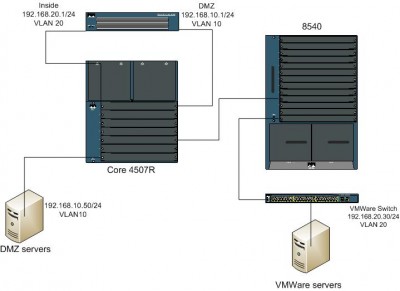
Thanks again to everyone who replied to my last post... I've got another project related to the same VMWare server...
I have a situation where I need to set up network access for a new virtual server in a vlan where most of the existing hosts are on the other side of a PIX 525 (running 7.2(2)).
The other hosts in the vlan are connected to a 4507 core switch, which is connected to an interface which is the DMZ and has the default gateway address of that vlan. Actually, the vlan, let's use the number
10, was set up at one point but is currently shutdown. The connection to the PIX is an access port in the 10 vlan. The inside interface is connected to another port on the same 4507. The port the inside interface is connected to is an access port in the central site's core vlan... let's use 20 for this discussion.
The VMWare server is 2 hops away, first through an ATM connection to a
8540 (set up with IRB) to a 3560. Two other things about the configuration that might be important: (1) there is a second PIX in an active/standby configuration, and (2) the inside ports that the two PIXes are connected to is the source in a port mirror to a port that a content filter is connected to.
I'm guessing that some sort of routing needs to be set up on the PIX (es)... what is the best method of doing that? Since this is a production network, I was hoping to have to change as little as possible (obviously...)